
The green dot in Snapchat is one of the most confusing features for new users. Many people in India (and worldwide) often think it means someone is “online right now,” but the reality is a bit more nuanced.
This detailed 1,500+ word guide explains everything—what the green dot means, where it appears, how accurate it is, privacy concerns, and how to turn it off—using simple language and structured tables.
Table of Contents
What Does the Green Dot in Snapchat Mean?
The green dot on Snapchat is officially called the Activity Indicator. It shows that a user has been recently active on the app.
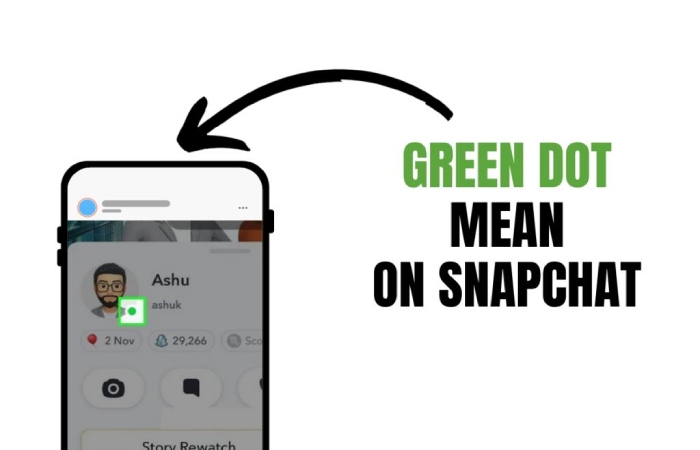
However, here’s the key point:
- It does NOT always mean the person is online right now
- It usually means they were active recently (sometimes within minutes or up to 24 hours)
In simple words:
Green dot = Recently active (not necessarily currently online)
Quick Overview
| Feature | Meaning |
| Green Dot | User recently active on Snapchat |
| Real-time status | Not always accurate |
| Visibility | Only if Activity Indicator is ON |
| Location | Appears near Bitmoji/avatar |
| Control | Can be turned OFF in settings |
Where You See the Green Dot in Snapchat
The green dot does not appear everywhere in the app. It shows up in specific sections.
Main Locations
| Section | What You See |
| Quick Add | Green dot beside suggested users |
| Friends List | Next to Bitmoji |
| Profile View | On top of avatar |
| Search Results | Sometimes visible |
| Chat Window | Rare or limited |
It does NOT appear in:
- Stories
- Snap Map
- Inside chat messages
Types of Green Dot You May Notice
Interestingly, there are two types of green dots people confuse:
1. Snapchat Activity Indicator
- Shows recent activity
- Appears near profile or Bitmoji
- Controlled by Snapchat settings
2. Device Privacy Indicator (Android / iPhone)
- Appears at the top of screen
- Means camera or microphone is in use
- Not related to Snapchat activity
How Accurate Is the Green Dot?
This is where most confusion happens.
Reality Check
| Situation | Meaning |
| Green dot visible | Active recently |
| No green dot | Not active OR turned off |
| Dot stays long | Could be up to 24 hours |
| Dot disappears | No recent activity |
Important insight:
- It is not a live “online” indicator like WhatsApp
- It is more like a “recently seen” signal
Common Misconceptions
Myth vs Reality Table
| Myth | Reality |
| Green dot = online now | Not always |
| Green dot = reading my message | Wrong |
| No dot = inactive | Could be hidden |
| Dot is always accurate | Approximate only |
Why Snapchat Uses the Green Dot
Snapchat added this feature to improve engagement.
Main Reasons
- Helps you know who is active
- Encourages chatting and snapping
- Makes friend suggestions more relevant
- Competes with apps like:WhatsApp, Instagram
How the Green Dot Works
Activity Tracking Logic
| Action | Triggers Green Dot |
| Opening Snapchat | Yes |
| Sending snaps | Yes |
| Chatting | Yes |
| Background activity | Usually no |
| Receiving messages | Not always |
It depends on actual app usage, not just notifications.
How to Turn OFF the Green Dot
If you value privacy, you can disable it easily.
Steps:
- Open Snapchat
- Tap your Bitmoji (top-left)
- Click Settings ⚙️
- Go to Privacy Controls
- Tap Activity Indicator
- Turn OFF
Settings Summary Table
| Option | Result |
| ON | Others see your activity |
| OFF | Hidden from others |
| Mixed | You see others, but they don’t see you |
Does the Green Dot Show for Everyone?
No. There are conditions.
Requirements
| Condition | Required? |
| Both users added each other | Yes |
| Activity Indicator enabled | Yes |
| Privacy settings allow | Yes |
If you don’t see it:
- User turned it off
- Not mutual friends
- App glitch
Privacy Concerns
Many users in India worry about privacy.
Key Concerns
- Others can track your activity
- Creates pressure to reply quickly
- Can lead to misunderstandings
Example Scenario
- You open Snapchat for 2 minutes
- Green dot shows for hours
- A friend thinks you’re ignoring them
This happens because it shows recent activity, not live status
Benefits of the Green Dot
| Benefit | Explanation |
| Faster chatting | Know who is active |
| Better engagement | More replies |
| Social interaction | Easier connection |
| Friend suggestions | Smarter recommendations |
Drawbacks of the Green Dot
| Problem | Explanation |
| Privacy issues | Others track activity |
| Misinterpretation | Seen as “online now” |
| Pressure | Expect quick replies |
| Inaccuracy | Not real-time |
Comparison with Other Apps
| App | Status Type | Accuracy |
| Snapchat | Recently active | Medium |
| Last seen / online | High | |
| Active now | High |
Frequently Asked Questions
1. Does green dot mean someone is chatting?
No. It only means they were active recently.
2. How long does the green dot stay?
A few minutes to up to 24 hours, depending on activity
3. Can I hide my green dot?
Yes, from settings (Activity Indicator OFF)
4. Why don’t I see a green dot for some friends?
- They turned it off
- Not mutual friends
- Feature disabled
5. Is green dot 100% accurate?
No. It is approximate.
Expert Tips
- Don’t assume someone is ignoring you
- Use Snap Map for better activity clues
- Turn OFF indicator if privacy matters
- Combine with “typing” indicator for real-time clues
Summary Table
| Topic | Key Takeaway |
| Meaning | Recently active |
| Real-time? | No |
| Duration | Minutes to 24 hours |
| Location | Bitmoji / Quick Add |
| Control | Can turn OFF |
| Accuracy | Medium |
Final Conclusion
The green dot in Snapchat is a simple but often misunderstood feature. It doesn’t show real-time online status—it only indicates recent activity. While it helps improve communication and engagement, it can also create confusion if misunderstood.
For users in India, especially beginners, the best approach is:
Use it as a hint, not proof of someone being online.
If privacy is your concern, simply disable it and enjoy Snapchat without pressure.
Also read: Invoke-WebRequest: Guide for Power Shell Users in the United States